Financial investigation software for authorities and investigators
From bank statement
to evidence.
INSTRAM turns any bank's statements into uniform, signed data. BTD then follows the money across every account in a case, looks for patterns, and writes the report.
- Any bank, any format
- A signed data path between the two programs
- On your own server or online
The starting point
Every bank writes the same thing differently.
A case holds many accounts, from several banks, in several kinds of file. One bank sends its statement as a PDF, another as a spreadsheet, a third as a text file. The headers differ, the dates differ, the sign sits somewhere else. Before any analysis can start, the data has to be made uniform – by hand that is slow, and easy to get wrong.
How it works
Three steps, two programs, one data path.
-
1
INSTRAM
Read
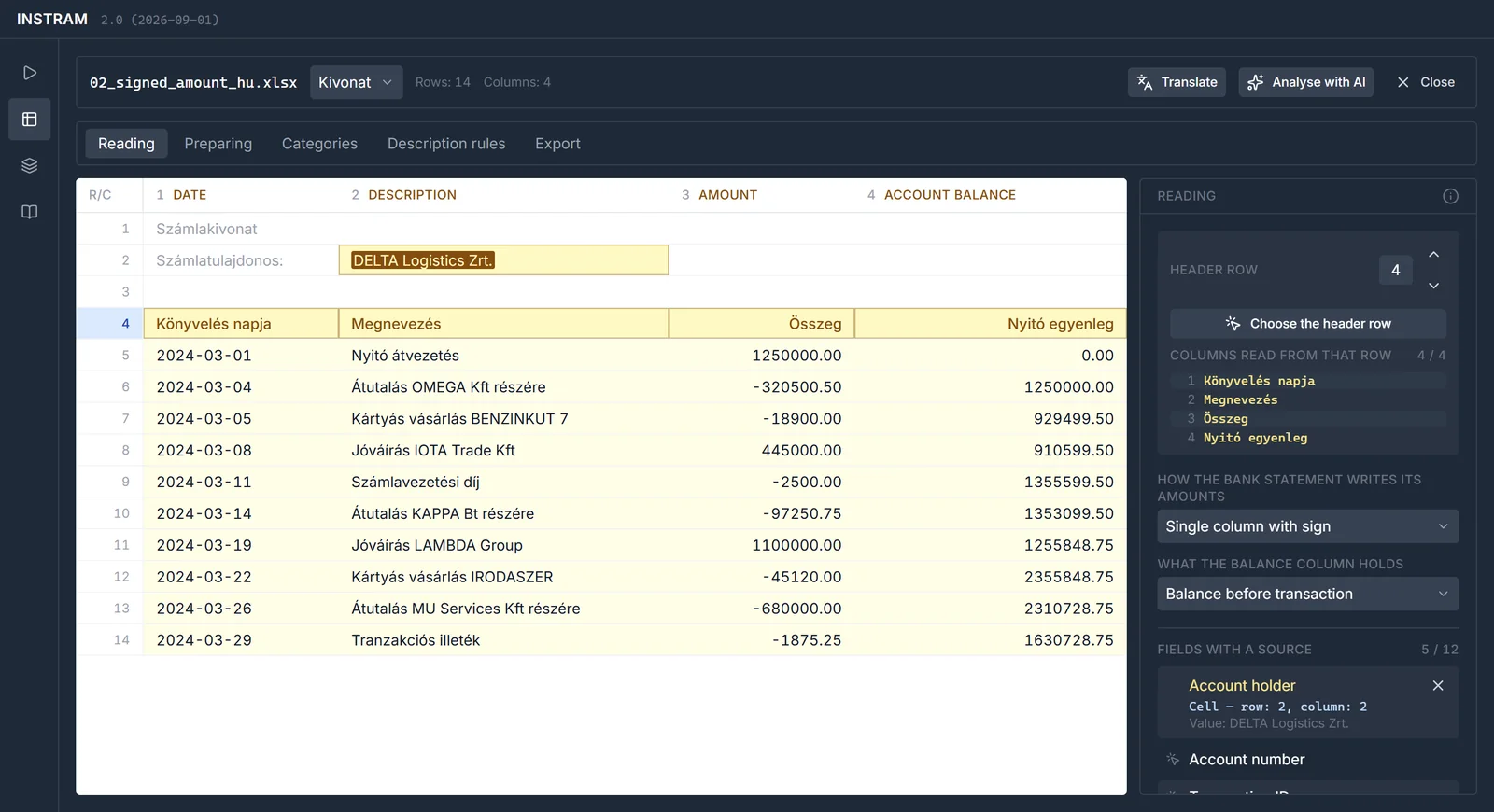
INSTRAM finds the header in a statement and works out which column is the date, the amount, the counterparty, the narrative. A bank's format needs a template only once.
-
2
INSTRAM → BTD
Uniform, signed data
Every statement becomes the same 17-field dataset, in one signed CSV. If anyone alters the file, BTD will not accept it.
-
3
BTD
Analyse
BTD loads every account into one case, reconciles the account holders, and opens the analysis: filtering, labelling, graphs, chain tracing, scenarios, reporting.
INSTRAM · Integrated Solution for Transaction Mining
Any bank's statement, as uniform data.
INSTRAM is the statement-processing program. An analyst builds the template for a bank's format once; investigators then run it over statements in bulk, and every run yields the same standard dataset.
-
Any format
xlsx, xls, csv, txt and pdf, from any bank in any layout. It detects the character encoding too, Central European and Cyrillic statements included.
-
One template, any number of runs
A template remembers how to read a bank's statement: header, cleanup, field mapping, categories, extraction rules. It can be reused on every file with the same structure.
-
Analyst and investigator
The analyst builds templates, the investigator runs them. ATM mode processes many statements in one pass, on the investigator's own machine.
-
AI suggestions, human decisions
For a new bank format the program suggests what the columns mean and which rules to apply. The analyst approves each suggestion, and the interface shows what came from the model.
-
No half-finished results
If a step fails, that worksheet produces no output. Nothing looks finished that is not. Every operation is logged and can be undone.
-
No installation
A single executable, nothing to install – easy to hand out for a trial and to roll out to many machines. The interface speaks the user's language.
BTD · Bank Transaction Dashboard
Every account in a case, analysed in one place.
BTD is the investigative analysis program. It opens a case from INSTRAM's data, reconciles the way different banks spell the same holder, and from then on you can ask what matters in the case: where the money came from, where it went, and who stands in the chain.
-
Account holders reconciled
The same holder may appear under several spellings across statements. BTD merges them and keeps the original values, so the step can be reversed.
-
Eight views, one filter
Table, graph, timeline, candlestick, world map, summary, accounts and counterparties – all with the same filter, labels and saved views.
-
Chain tracing
The money's path from account to account, forwards and backwards, across several hops – exported to an Excel workbook and to PDF.
-
Scenarios
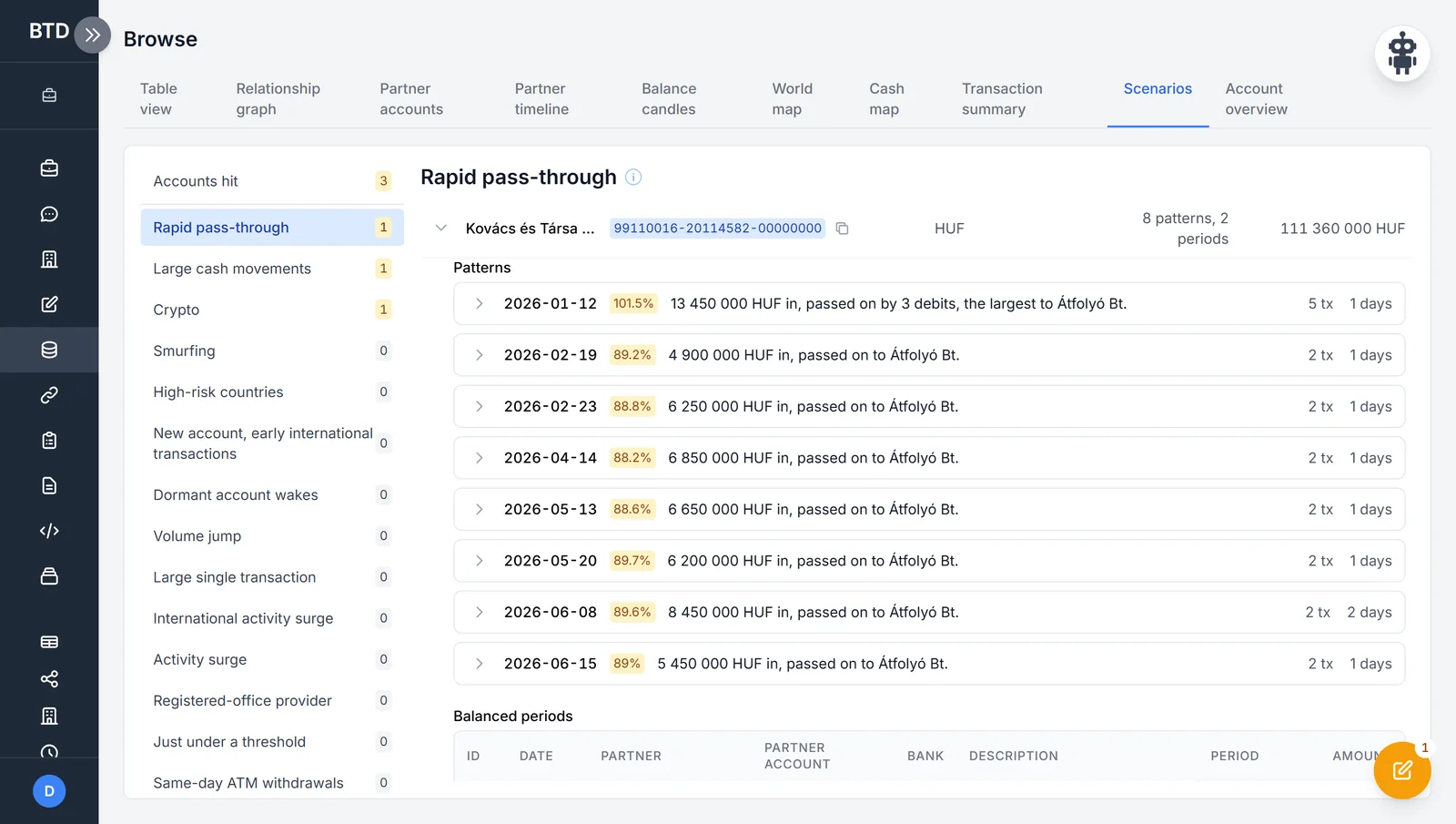
Cash-intensive, international, pass-through and crypto patterns; series just under a round amount; two companies' large ATM withdrawals on the same days. Thresholds are adjustable, each change with its reason.
-
Lists and registries
OFAC and UN sanctions lists, high-risk countries, the full IBAN country registry, the Hungarian company and bank branch registries.
-
Risk ranking
BTD ranks a case's accounts by risk indicators, and tells you which statements are worth requesting next.
-
Cash map New
ATM and counter withdrawals and deposits placed on the country's ATM and branch network: the same spot, the same town, or far from the registered office.
-
Questions in plain language
The AI chat turns a question into an analysis function, the program runs it in isolation, and returns a table, a chart or a workbook. The model never receives the bank rows.
-
Reports and exports
A report editor, Excel, PDF and Word exports, document filling. Every export and download is written to the case's event log.
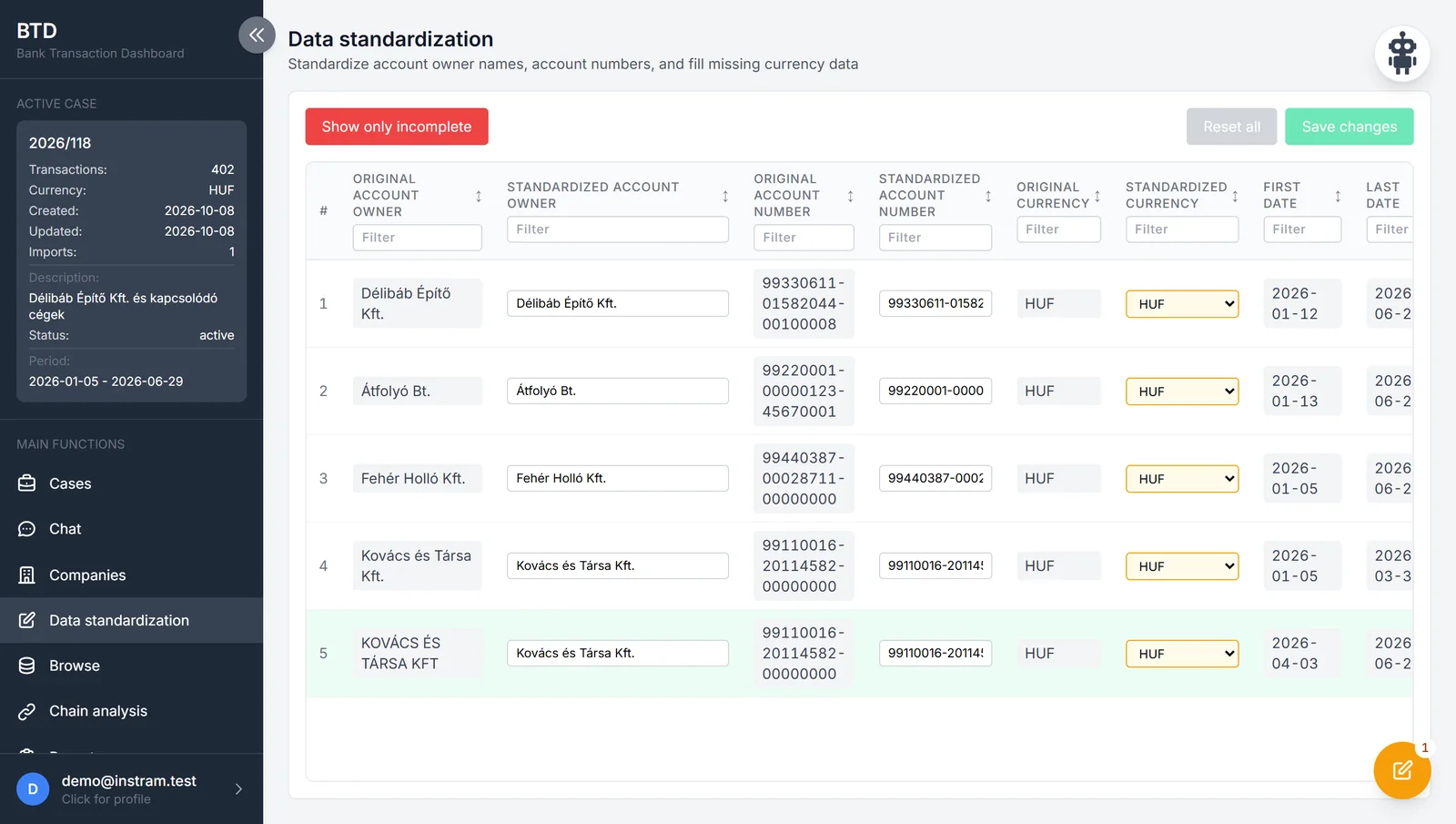
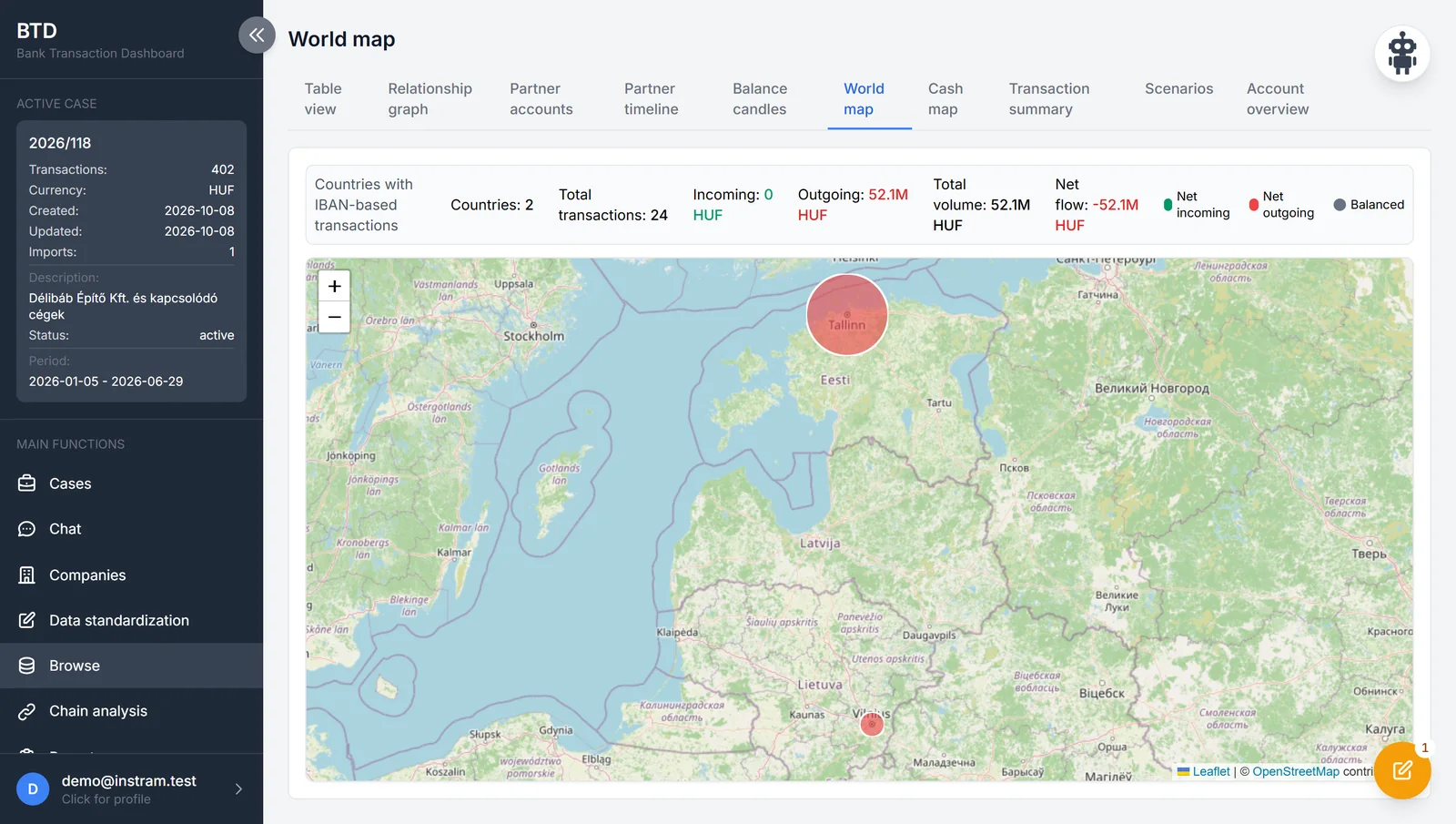
The pictures are taken from the programs' real interface, with the data of invented companies and accounts. Click a picture to see it full size.
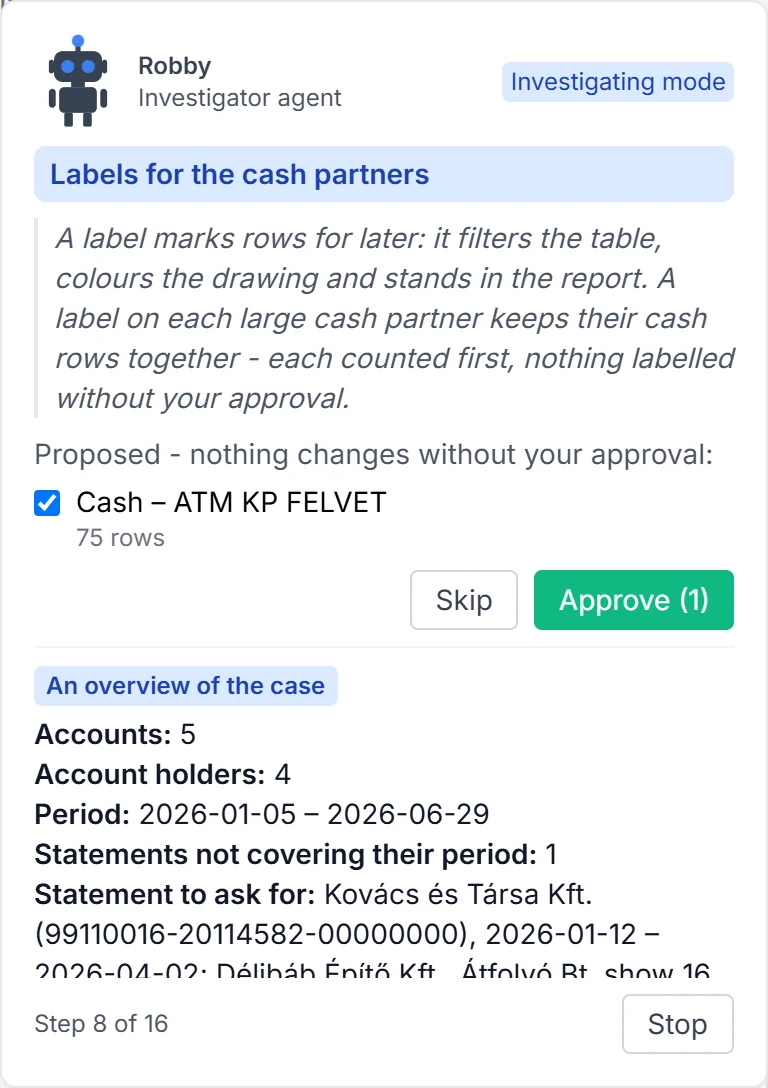
Robby · the investigator's assistant in BTD
Robby uses BTD the way an experienced investigator does.
It reads the case, tidies the account holders, runs the scenarios, recognises the type of case, and carries on accordingly: filters, labels, draws charts, exports, writes the report. It works through the program's own actions while the interface follows – every step is in plain view.
Teaching mode
Shows what is worth doing when, and why. A new colleague learns the program on their own case.
Investigating mode
Does the routine steps for the investigator, and finishes with a report and a workbook.
The decision stays with the investigator. Every step Robby takes goes into the case's event log. Its AI layer sees only a pseudonymised extract, and runs only when the operator has switched it on and the investigator has approved it.
Security and accountability
If it may become evidence, the way it got there matters.
-
A signed data path
INSTRAM's output is a signed CSV (HMAC-SHA256). BTD refuses any file that has been altered or is unsigned.
-
An empty field is not zero
If the bank did not state something, the field stays empty. The program does not invent data, and does not fill a gap with zero.
-
Event log
Every export and download in a case is logged. A download link opens only for the person who requested it.
-
Your own server
BTD can be installed on the organisation's own server, inside its own network. An online environment is available for trials.
-
AI under the investigator's control
The AI features can be switched off. The chat model never receives the bank rows; Robby's AI layer sees only a pseudonymised extract.
-
Reversible steps
Reconciliation keeps the original values, and template operations can be undone. Every result can be traced back to its source file and worksheet.
Who it is for
For authorities and investigators who work from bank accounts.
Wherever a case unfolds across many accounts, several banks and thousands of transactions – and the result has to stand up.
- Financial investigation and asset tracing
- Anti-money-laundering and fraud detection
- Tax and customs investigations
- Analysis of economic crime
Case types BTD's scenarios are built for
- Cash-intensive
- International
- Pass-through
- Crypto
How to start
Demo, trial access, quotation.
-
1
Write to us
Tell us briefly what kind of cases you work on, and how many people would use the programs.
-
2
Demo and trial access
We show you both programs. On request we give you online trial access to BTD.
-
3
Quotation
Tailored to the organisation: the number of users, how it is installed, how it is introduced.
Contact
Request a demo or a quotation.
Your message comes straight to us, and we reply by email. Prices are given in a quotation, tailored to the organisation.
Or write to us directly:
info@instram.hu